

Trusted by 3,500+ users
Planboard and Trip Planboard: visual transport planning software within Adaption’s TMS
Transport planning quickly becomes vulnerable when orders, vehicles, and drivers do not come together in the same overview. The planboard helps planners visually manage capacity, trips, and changes.
Adaption brings transport planning, trip building, and status information together within the TMS. This allows your planner to work from one operational screen with up-to-date TMS data, trip information, documents, and driver communication.
The planboard gives you an at-a-glance overview of all transport assignments.
With the trip planboard, you smartly combine shipments into trips and directly manage drivers via the driver app.
Both modules are integrated and work seamlessly with the WMS and FMS.
Discover in 15 to 30 minutes how Adaption’s planboard and trip planboard make your transport processes smarter and more efficient
"*" indicates required fields
TRUSTED BY LOGISTICS LEADERS SUCH AS





Adaption’s (trip) planboard for transport companies

Recognizable problem
When transport planning becomes fragmented, operations lose control
Many transport companies and logistics service providers still work with a combination of Excel and email to complete their daily planning. The planner has an overview in their head, but as soon as something changes, manual replanning begins. This takes time, increases the risk of errors, and leads to frustrated customers who are informed too late or incompletely.
As your organization grows, this problem only becomes bigger. Without integrated planning software, you lose control over operations. The right transport planning software prevents your planner from reinventing the wheel every day and gives you, as an operations director or logistics manager, the insight you need to intervene where it matters.
Adaption's logistics solution
Adaption TMS makes transport planning visual, up to date, and executable
The planboard and trip planboard are the planning modules within Adaption’s TMS that enable your planner to visually manage the full daily schedule. No separate lists, no phone calls to retrieve statuses, and no manual recalculations when something changes.
The 5 benefits of transport planning with Adaption TMS software
1. Real-time insight on one screen
All active trips, planned shipments, available vehicles, and driver statuses are visible in one interface. Your planner does not need to switch between systems to get a complete overview of the day.
2. Drag-and-drop planning without manual calculations
Rearranging shipments, adding orders to an existing trip, or moving an assignment to another driver can be done with just a few mouse clicks. The system automatically updates planned times, allowing you to focus on operations instead of administration.
3. Direct communication with drivers via the driver app
Changes in the planning are automatically pushed to the driver app. Drivers receive pop-up messages with new instructions without the planner needing to call.
4. Fewer planning errors and shorter response times
Because all information is stored in the same system, from order details to contact information and documents, errors caused by miscommunication or duplicate data entry are significantly reduced. In the event of disruptions, a planner can intervene immediately and proactively inform customers.
5. Fully integrated with WMS and FMS
The planboard does not function as a standalone module but as part of the Adaption Logistics Cloud Suite. Integrations with the Warehouse Management System ensure that inventory information and loading capacity are always up to date in transport planning.

Seamlessly integrates with your current IT landscape
Adaption integrates seamlessly with your existing IT landscape and connects with the systems you already use. From ERP systems and webshops to carriers and accounting packages, all data flows come together in one logical whole. Thanks to open APIs, virtually any integration is possible. If your system is not listed, we will make it fit.





The planboard
Visual transport planning for logistics planners

What is the Transport planboard?
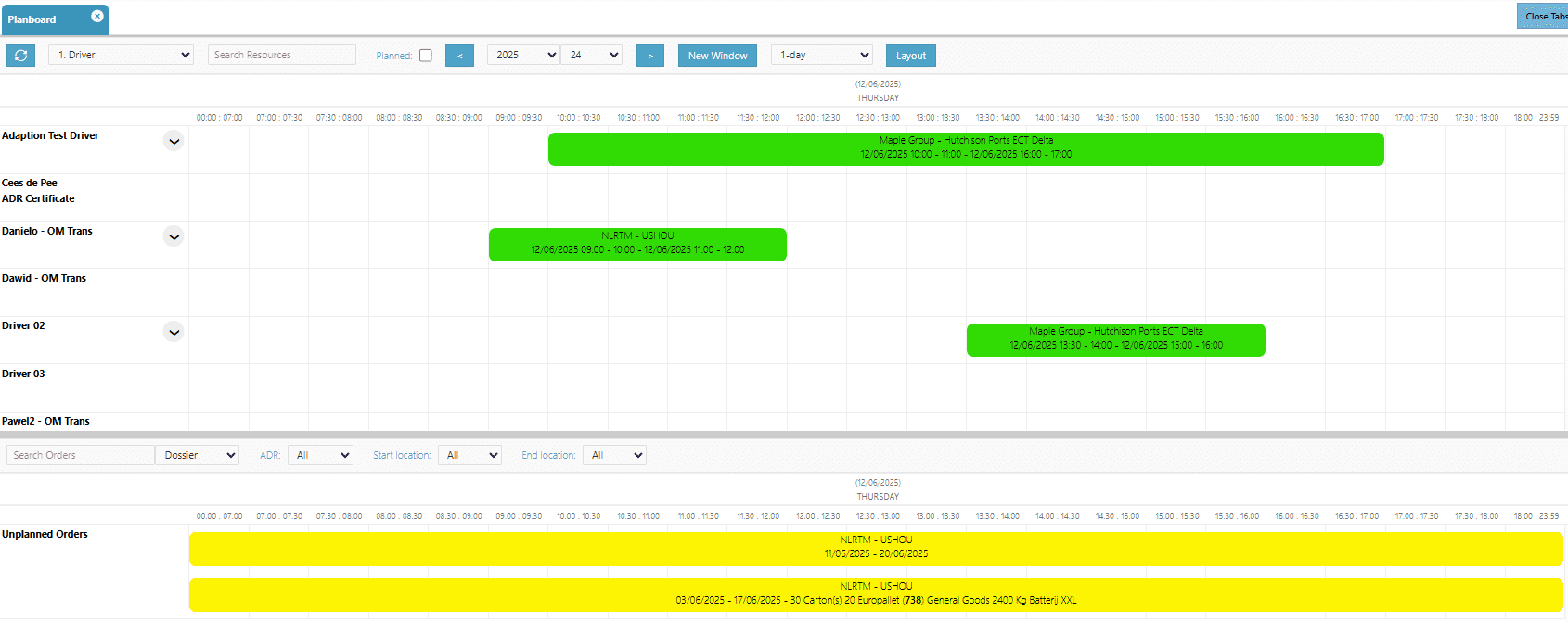
The planboard is the interactive, graphical display of all transport assignments within the Adaption TMS. Through one central interface, you can see at a glance which trips are scheduled, which shipments still need to be planned, and which vehicles and drivers are available. The module displays current routes, loading and unloading locations, order details, and expected arrival times in a clear schedule.
The planboard software is designed for planners who need to act quickly. Thanks to its intuitive setup, you can immediately see where capacity is available and where bottlenecks may arise. All relevant information, from order data to document management, is connected and accessible from the same interface. Separate Excel files or separate communication channels are no longer needed.
(Click on the image for a larger view)
How does the planboard work in practice?
The core of the module is the drag-and-drop functionality. A planner selects a shipment and moves it in one action to an available vehicle or another time slot. The system automatically adjusts the planned times and communicates the change directly to the relevant driver via the driver app. No manual recalculations are required.
In addition to rearranging trips, the planboard also supports adding last-minute shipments and handling disruptions such as traffic jams or loading delays. Planners can take immediate action from the overview without having to switch to other screens or systems.
Who is the planboard suitable for?
The planboard is particularly suitable for transport companies and logistics service providers that work daily with multiple vehicles and drivers and need a centralized, visual planning overview. Whether you operate with your own fleet or work with a combination of permanent drivers and charters, the planning module gives your planner the control needed to work quickly and without errors. The module is also strong for organizations that want to improve their customer communication by proactively providing real-time information about delivery times.

The trip planboard
Trip planning software for combining shipments

What is the trip planboard?
The trip planboard is an extension within the Adaption TMS that enables planners to efficiently combine shipments into complete trips. While the planboard focuses on managing individual trips and assignments, the trip planboard goes one step further: it provides a direct overview of all ongoing and planned trips, including statuses, driver details, and current progress from the field.
Through color codes, trip statuses are immediately recognizable. Planners can see at a glance which trips are active, which are delayed, and which shipments have not yet been assigned. The planning tray on the left side of the screen shows all unplanned shipments that can be combined with active or new trips. This makes the trip planboard a full-fledged trip planning software solution for organizations with a dynamic and high-volume transport process.
(Click on the image for a larger view)
How does the trip planboard work in practice?
The system actively supports planning. When a driver finishes earlier than planned, this immediately becomes visible in the overview. The planner can quickly add extra orders to the relevant trip. The trip planboard also automatically suggests the driver who has driven the route before, increasing familiarity with customers and reducing onboarding time for the route.
Communication with drivers takes place directly through pop-up messages in the driver app. Orders that can no longer be scheduled are placed back into the planning tray by the planner and combined later with another trip. This ensures optimal fleet utilization without compromising delivery reliability.
Who is the trip planboard suitable for?
The trip planboard is especially suitable for organizations that work with consolidation, groupage, and multi-stop trips, where multiple shipments are combined into one trip. Companies that deal with highly variable trip volumes, where capacity needs to be redistributed daily, also benefit from the dynamic planning environment. The module is fully customizable: color codes, filters, and views can be configured according to the way your planning team works.
Prefer to get acquainted first or receive more information before booking a free demo?
We are happy to help, feel free to contact us.
Frequently asked questions about the planboard and trip planboard
The planboard provides a graphical overview of all transport assignments and makes it easy to plan, rearrange, and monitor trips. The trip planboard builds on this and is specifically focused on combining shipments into complete trips, including driver management, status colors, and direct communication via the driver app. Both modules are part of the Adaption TMS and complement each other.
The planboard continuously displays up-to-date information about trips, planned arrival times, and driver statuses. When a driver submits an update via the driver app, it is immediately visible to the planner. Changes made by the planner are also communicated directly to the driver. This ensures that the planning software is always synchronized with the reality on the road.
Yes. The module is scalable and works just as well for a fleet of five vehicles as for a fleet of fifty. Smaller transport companies in particular benefit from the time savings and visibility that digital trip planning provides, because the planner there often combines planning with other tasks. The visual setup ensures that new employees can quickly start working with the system.
Yes. The planboard and trip planboard are fully integrated into the Adaption Logistics Cloud Suite. Through the connection with the Warehouse Management System, inventory information and available loading capacity are directly visible in the planning environment. This prevents transport from being planned for goods that are not yet ready in the warehouse.
Both options are possible. Via the trip planboard, you can manually combine shipments using drag-and-drop, based on routes, capacity, and availability. At the same time, the system actively supports the planner by automatically suggesting a driver based on previous trips. This means you always make the final choice yourself, without having to reinvent the wheel.
When the planner makes a change to a trip or adds a new order, the driver automatically receives a pop-up message in the driver app. The driver sees the updated assignment immediately on their mobile device and does not need to call the transport planner for confirmation. This significantly speeds up communication and reduces the risk of miscommunication during last-minute changes.
Both modules are available as part of Adaption’s Transport Management System, which in turn is part of the Logistics Cloud Suite. The system runs entirely in the cloud, giving planners remote access to the transport planning environment as well. No local installation is required.
Discover how Adaption makes your transport planning clearer
Do you want to see how Adaption can support your planning, trip building, and execution? Schedule a free demo with Toon Schilder and discuss in 15 to 30 minutes where your current planning gets stuck, which processes have priority, and how Adaption TMS can help.
During the demo you will gain insight into:
How the TMS works in practice
Support for your logistics processes
Integration and expansion possibilities
Or contact us via:
Schedule a free demo with Toon Schilder
Discover in 15 to 30 minutes how Adaption’s planboard and trip planboard make your transport processes smarter and more efficient
"*" indicates required fields